5 min read
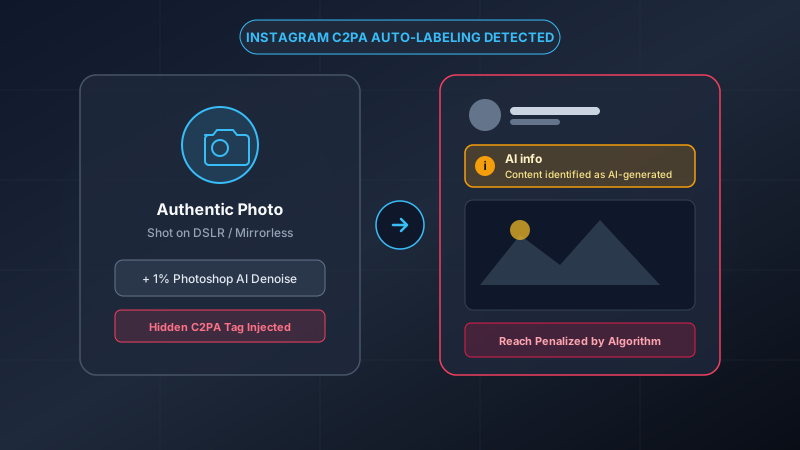
Why Instagram Slapped "AI Info" on Your Real Photo
How minor Photoshop Generative Fill or Lightroom Denoise embeds secret C2PA tags that trigger Meta.
Read Guide
Permanently strip hidden C2PA Content Credentials, Adobe XMP tags, and EXIF/GPS metadata. Eliminate automated "AI Info" and "Made with AI" labels on Instagram, TikTok, Facebook, and Etsy. Processed 100% locally inside your browser.
Supports JPG, PNG, and WebP (Up to 15MB each).
100% processed locally on your device. Zero server transmission.
Comprehensive file sanitization that targets the exact mechanisms used by modern social media algorithms.
No cloud servers, no databases, no tracking. Your images are loaded into your browser's sandboxed memory and cleaned locally. Turn off your Wi-Fi and the tool still functions.
Permanently strips cryptographic Content Credentials and JUMBF metadata boxes used by Meta, TikTok, and Microsoft to automatically flag AI-assisted content.
Deletes residential GPS coordinates, camera serial numbers, lens profiles, and shooting timestamps that compromise your real-world personal privacy.
Wipes hidden PNG text chunks (`tEXt`/`iTXt`) from ComfyUI and Stable Diffusion to stop competitors from stealing your prompts, seeds, and model workflows.
Got a visible generator corner stamp or watermark? Use our interactive brush canvas to mark the logo, and our localized neighbor-pixel box blur blends it away cleanly.
Applies microscopic, human-imperceptible RGB perturbation ($\pm 3$) across non-transparent pixels, breaking perceptual hashes and naive statistical frequency classifiers.
Select or drag your pictures. Files are loaded strictly into your browser's local RAM. No network packets are sent to remote servers.
Visual pixels are repainted on a pristine HTML5 canvas. All C2PA manifests, Adobe XMP tags, and EXIF/GPS logs are severed. Anti-detection micro-noise is applied.
Download individual cleaned files or 1-click export the whole batch as a neat ZIP file. Publish safely to Instagram, TikTok, or Etsy without synthetic flags.
Comparing methods for sanitizing AI metadata and protecting photo privacy.
| Method / Technique | Removes C2PA & AI Tags | Zero Server Uploads | Preserves Image Quality | Batch Processing |
|---|---|---|---|---|
| Remove AI Label (This Tool) | ✓ 100% Severance | ✓ 100% Client-Side | ✓ 92%+ High Quality | ✓ Yes (ZIP Archive) |
| Cloud-Based EXIF Strippers | ✓ Yes | ✗ Uploads to Server | ~ Often Compresses | ~ Often Requires Pro Plan |
| Taking Phone Screenshots | ✓ Yes | ✓ Local | ✗ Destroys Resolution | ✗ Manual 1-by-1 Only |
| Command-Line ExifTool | ✓ Yes | ✓ Local | ✓ Lossless | ✗ Requires CLI Coding |
Social networks like Instagram, TikTok, and Facebook do not inspect aesthetic qualities to label AI content. They parse invisible binary records called C2PA manifests and Adobe XMP schemas.
Even if 99% of your photo is real optical light, minor edits in Photoshop (Generative Expand) or Lightroom (AI Denoise) inject an indelible Content Credential. Learn more in our guide on Why Instagram Slaps AI Info on Real Photos.
The Coalition for Content Provenance and Authenticity (C2PA) attaches a cryptographic manifest tracking generation models, software licenses, and editing history.
By re-encoding image pixels onto an isolated HTML5 canvas, Remove AI Label severs the cryptographic chain without altering visual colors. Read our architectural deep dive on What is C2PA Metadata & How It Works.
E-commerce algorithms de-rank listings marked as raw synthetic renders, while competitors scrape proprietary prompts directly from Midjourney and ComfyUI PNG chunks.
Sanitizing your product mockups protects both your organic discovery and your intellectual property. Read our tactical guide on Protecting Etsy Listings & Pinterest from AI Bans.
Original smartphone photos carry geographic coordinates, timestamps, and device hardware serial numbers. When uploaded to marketplaces or forums, this data exposes your home address.
Remove AI Label automatically strips all EXIF and GPS tags with zero server uploads. Learn more about Photo EXIF Privacy Risks.
Everything you need to know about AI provenance, C2PA content credentials, and photo privacy.
How minor Photoshop Generative Fill or Lightroom Denoise embeds secret C2PA tags that trigger Meta.
Read Guide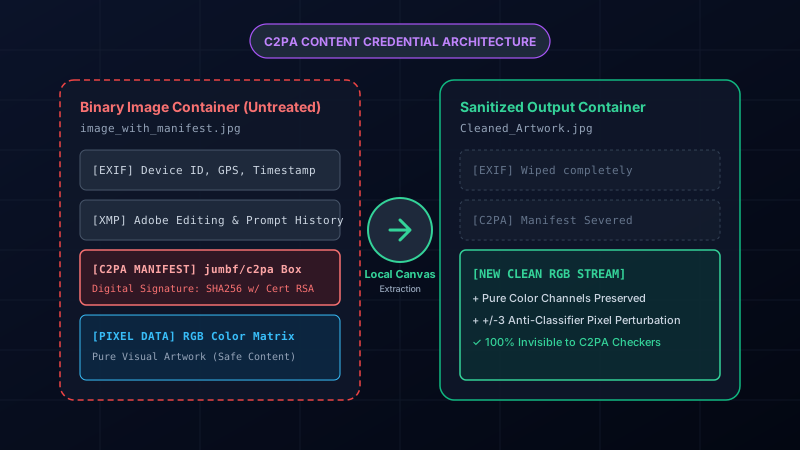
An architectural breakdown of content provenance manifests and how canvas re-rendering severs them.
Read Guide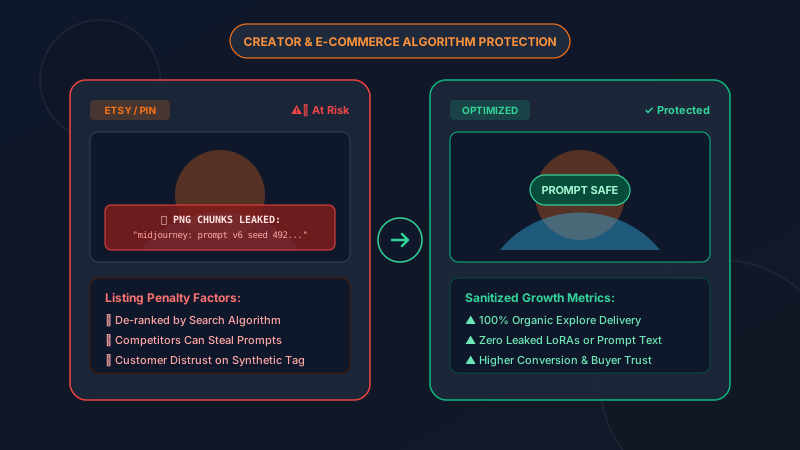
Prevent marketplace bot penalties and stop competitors from scraping your prompts from PNG chunks.
Read Guide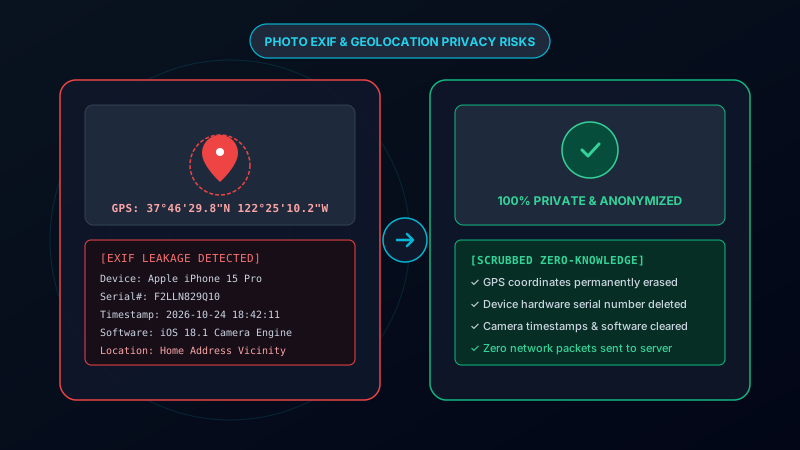
Learn what EXIF metadata exposes (GPS, serials, times) and why serverless cleaning is essential.
Read Guide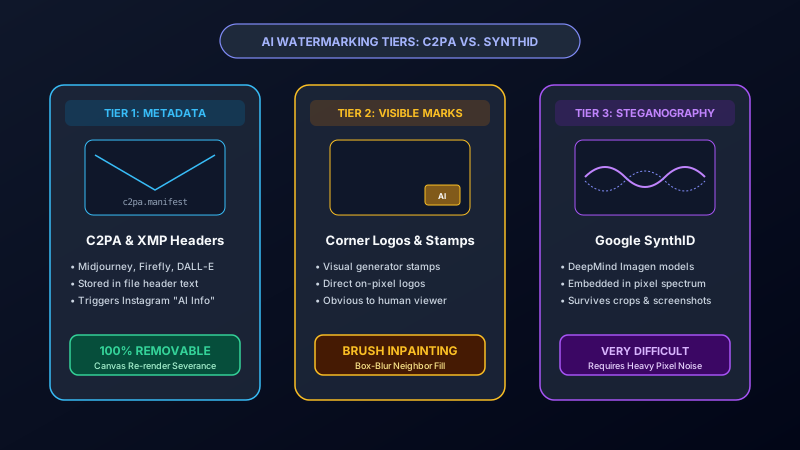
An honest comparison between file-level metadata and Google DeepMind's frequency steganography.
Read Guide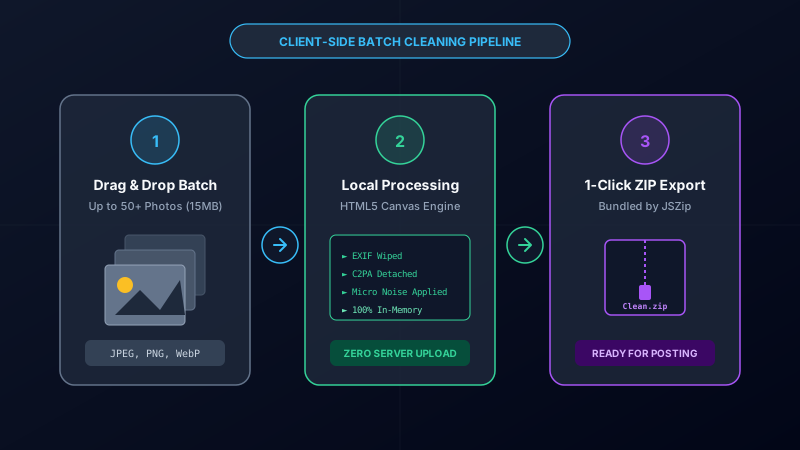
Clean 50+ photos at once, avoid carousel contamination, and export a private ZIP bundle.
Read Guide