
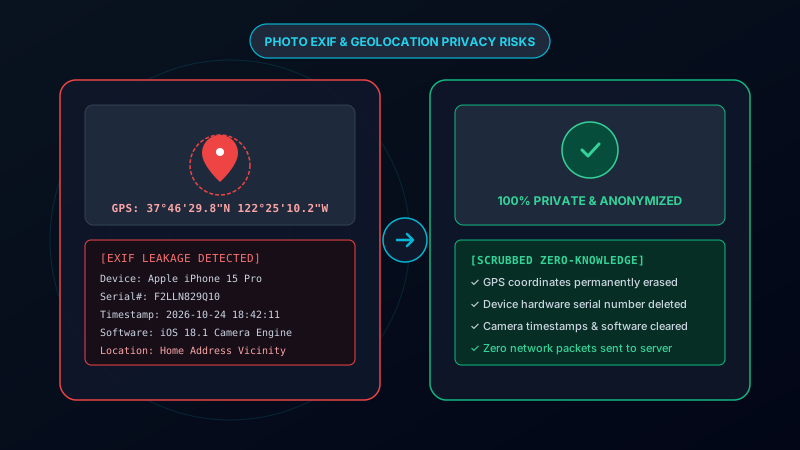
When you snap a photo with your iPhone, Android, or mirrorless camera, the device records far more than just light.
Tucked into the binary structure of the file is a comprehensive record known as EXIF (Exchangeable Image File Format) data. While originally introduced to help photographers organize camera apertures and lens information, it has evolved into a serious digital footprint vulnerability.
What is EXIF Data & Why Does It Exist?
Established by Japan Electronic Industries Development Association (JEIDA) in 1995, EXIF format allows cameras to record shooting telemetry:
- Optical parameters (F-stop, ISO, shutter duration, focal length).
- Hardware identifiers (camera serial numbers, lens IDs, firmware revisions).
- Environmental sensor data (altitude, compass direction, ambient temperature, GPS).
In offline photography catalogs (like Adobe Lightroom), EXIF data is harmless. The danger arises the moment you post or send the original file across the internet.
What Your Photos Secretly Expose About You
A Real-World Threat
If you take a photo of an item you want to sell on Facebook Marketplace, Craigslist, or a Reddit forum, the original image may contain your exact street address. Anyone who downloads the photo can extract your precise geographic coordinates in seconds.
Here is what an ordinary EXIF reader extracts from an untouched smartphone snapshot:
| Data Field | Sample Extracted Value | Privacy / Security Impact |
|---|---|---|
| GPS Coordinates | 37°46'29.8"N 122°25'10.2"W |
Exposes home, workplace, or children's school location |
| Timestamp | 2026-10-24 18:42:11 UTC |
Reveals daily routines and confirms when you are away from home |
| Hardware Serial | F2LLN829Q10 |
Allows cross-platform device tracking across different pseudonyms |
| Software Version | iOS 18.1.0 Camera Engine |
Exposes unpatched operating system vulnerabilities |
The Irony of "Cloud-Based" EXIF Removers
When users realize their photos contain dangerous GPS coordinates, their first instinct is often to search for a "free online EXIF remover."
However, 90% of online metadata cleaners require you to upload your sensitive photo to an unknown third-party server.
Consider the risk: to protect your home's GPS location, you transmit your private, uncompressed photos to an unverified cloud database. That remote server now holds both your personal image and your exact residential coordinates.
Strip GPS and Camera Data Locally (Zero Uploads)
Our free in-browser cleaner wipes EXIF, GPS coordinates, and camera serial numbers without sending a single byte over the internet.
Wipe EXIF Data PrivatelyZero-Knowledge In-Browser Sanitization
The only secure way to sanitize digital photos is **client-side sandboxing**.
Using Remove AI Label:
- Your photo is loaded strictly into your browser's local RAM using HTML5 FileReader.
- The visual image is drawn onto an isolated canvas, which strips all EXIF, XMP, and C2PA headers.
- The file is re-exported directly to your local storage.
You can literally turn off your Wi-Fi or disconnect your internet cable after the page loads, and the tool will continue to clean your photos flawlessly.
Essential Privacy Hygiene for Photographers & Sellers
- Turn Off Geotagging in Camera Settings: On iPhone, go to
Settings > Privacy & Security > Location Services > Cameraand select Never. - Clean Marketplace Listings: Always scrub images of furniture, cars, jewelry, or electronics before listing them on peer-to-peer marketplaces.
- Sanitize Photos Shared in Public Messaging: Discord, Telegram (when sent as uncompressed files), and web forums frequently retain full EXIF data.