Over the past two years, the digital media ecosystem has experienced a fundamental paradigm shift. As generative AI models like Midjourney, DALL-E 3, and Stable Diffusion reached photorealistic quality, tech conglomerates, news agencies, and regulatory bodies established an authentication standard to track the origin of digital media.
Their answer is **C2PA**. Whether you are an AI prompt creator, a traditional photographer, or a digital marketer, understanding this specification is essential to navigating today's internet.
What is the C2PA Standard?
C2PA stands for the Coalition for Content Provenance and Authenticity. Founded as a joint initiative by Adobe, Microsoft, Google, Intel, Sony, and Meta, it specifies an open technical architecture to embed tamper-evident provenance metadata into digital media files.
Commonly referred to by Adobe as Content Credentials, the standard creates a cryptographically signed "digital nutrition label" that binds directly to the binary container of JPEG, PNG, WebP, and MP4 files.
What Information is Stored Inside a C2PA Manifest?
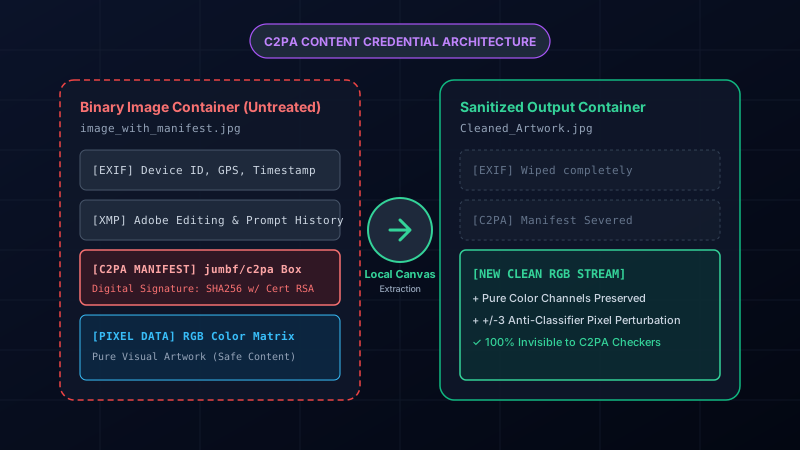
A C2PA container is composed of JUMBF (JPEG Universal Metadata Box Format) data blocks structured as signed assertions. It records:
- The Origin Engine: The exact generator used (e.g.
OpenAI DALL-E 3,Adobe Firefly 3,Midjourney v6). - Action Ingredients: Detailed logs of whether an image was created from scratch, inpainted, or outpainted.
- Cryptographic Hash Chain: SHA-256 hashes of the image payload signed by an authorized Certificate Authority (CA).
- Software & License Keys: Information identifying the editing application and operating system build.
The Cryptographic Guarantee
C2PA uses public-key cryptography. If an unauthorized tool attempts to alter even a single byte of the metadata without re-signing the certificate, the manifest breaks, triggering an "invalid credential" warning in metadata viewers.
How Social Platforms Scan and Read C2PA at Ingestion
When you tap "Share" on Instagram, TikTok, Facebook, or Pinterest, your file passes through an automated ingestion pipeline:
- Binary Header Inspection: The ingestion server parses the file's leading bytes searching for the
c2paorjumbfmarker box. - Certificate Verification: The server evaluates the signing certificate against trusted root lists (such as Adobe or Microsoft CA bundles).
- Automated Tagging: If the manifest indicates any generative model was used, the platform automatically affixes an "AI Info" or "Made with AI" badge to the post.
Notice that **no machine learning or visual analysis is required**—the file headers automatically alert the social network.
Eliminate C2PA Credentials in Seconds
Disconnect the C2PA cryptographic chain safely in your browser. No server uploads, zero quality loss.
Try In-Browser Cleaner FreeThe Critical Privacy and Workflow Risks of C2PA
While originally marketed as a defense against deepfakes, Content Credentials have created serious unintended issues for digital creators:
- Unwanted Cross-Account Linking: Because certificates can link to software licenses, creators who wish to maintain separate personal and professional profiles risk having their identities tied together.
- Algorithmic Penalties: Posts flagged with synthetic labels frequently suffer reduced reach on discovery feeds.
- Workflow & Prompt Exposure: Raw generative files often leak proprietary prompt structures, seed numbers, and generation settings in adjacent XMP tags.
How Local Canvas Rendering Permanently Severs the Chain
Traditional image editors struggle to remove C2PA because doing so may corrupt the manifest or leave residual fragments that raise flags.
The safest and most reliable technique is **local pixel extraction**:
- The browser reads only the raw color channels ($R, G, B, A$) and paints them onto an empty HTML5 canvas.
- All file-level metadata—including C2PA manifests, XMP bags, and EXIF tags—is discarded in memory.
- The canvas encodes a completely brand-new, virgin image container.
Because the resulting file contains no C2PA box whatsoever, social media scanners see a clean, authentic image file.