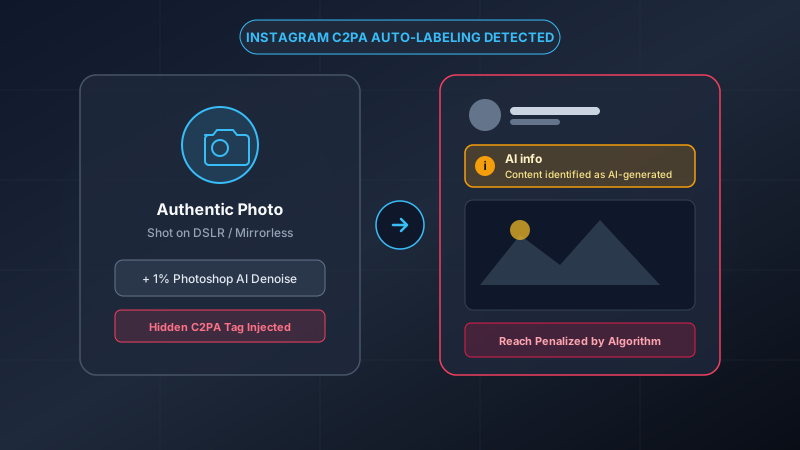
You spent three hours shooting during golden hour, dialed in your color grading in Lightroom, exported a razor-sharp JPEG, and shared it to your Instagram feed. Within seconds, a small, stubborn badge appears right under your handle:
The Infamous Warning
"AI info • Content identified as AI-generated"
Your followers start questioning if you faked the shot. Your engagement drops. You never typed an AI prompt, generated a synthetic model, or faked the scene. So why did Meta brand your real photograph as artificial intelligence?
The Real Culprit: Invisible C2PA Metadata
Contrary to popular belief, Instagram and Facebook algorithms are not using computer vision to inspect your photos for weird hands or unnatural textures. Instead, Meta's upload pipeline inspects hidden cryptographic data stored inside your image file known as C2PA (Coalition for Content Provenance and Authenticity) or Adobe XMP tags.
C2PA is a file-level specification backed by tech giants (including Adobe, Microsoft, Google, and Meta). It acts as a digital receipt that tracks how an image was made. If any neural or generative tool touches your photo during editing, your software quietly embeds an indelible, signed manifest into the image header.
4 Common Editing Tools That Secretly Trigger Meta
Even if 99% of your image is composed of raw light captured by a mirrorless camera, standard modern post-processing tools secretly inject the C2PA tag:
- Lightroom AI Denoise: Using neural denoising to rescue high-ISO evening or astrophotography shots.
- Photoshop Generative Fill or Remove Tool: Deleting a stray tourist, power line, or trash can in your background.
- Smartphone Computational Photography: Google Pixel "Magic Eraser" or Samsung Galaxy "Object Eraser".
- Apple Intelligence Clean Up (iOS 18+): Tapping the eraser icon in Apple Photos embeds a Content Credential into the photo's EXIF.
The Flaw in Meta's Policy
Meta's detection software does not differentiate between an entirely synthetic DALL-E prompt and a photographer who spent 2 seconds removing a dust speck on a camera lens using Photoshop. Both trigger the exact same cryptographic marker.
Why You Can’t Just "Turn It Off" in the App
When you upload an image containing a C2PA manifest, Instagram's automated system reads the signature and forces the "AI Info" label. There is no toggle inside Instagram to disable this label while those markers remain inside the file.
Furthermore, appealing the label through Instagram support rarely works because Meta's automated checks verify the cryptographic signature against recognized authority roots, concluding that the file was indeed "touched by AI."
Strip the Hidden C2PA Tag from Your Photo
Our free, in-browser tool re-renders your image onto a pristine canvas, severing all C2PA and Adobe metadata while preserving 100% of your visual resolution.
Clean My Photos NowThe Solution: Strip C2PA Credentials Before Uploading
To prevent Instagram from auto-labeling your photography, you must remove the metadata manifest from the file header before you post.
| Cleaning Method | Removes C2PA? | Preserves Quality? | Privacy / Zero Uploads? |
|---|---|---|---|
| Remove AI Label (Browser Canvas) | ✓ Yes (100%) | ✓ High (92%+ JPEG) | ✓ 100% Local / Safe |
| Taking a Smartphone Screenshot | ✓ Yes | ✗ Destroys Resolution | ✓ Local |
| Third-Party Cloud EXIF Stripper | ✓ Yes | ~ Depends on tool | ✗ Uploads photo to server |
Why the "Screenshot Trick" Destroys Your Quality
Some photographers attempt to bypass the label by taking a screenshot of their photo on their phone screen. While this does strip the header, it introduces serious drawbacks:
- Capped Resolution: An original 45-megapixel camera shot gets squished down to your phone screen's native resolution (often under 3 megapixels).
- Discarded Color Profiles: Wide-gamut color spaces (like Adobe RGB and DCI-P3) are discarded into generic sRGB, muting your colors.
- Banding in Gradients: Compression artifacts appear in skies, sunsets, and shadow gradients.
Using a dedicated in-browser canvas cleaner like Remove AI Label preserves your true dimensions and color integrity without sacrificing privacy.